Look at the camera.
Mootch keeps pace.
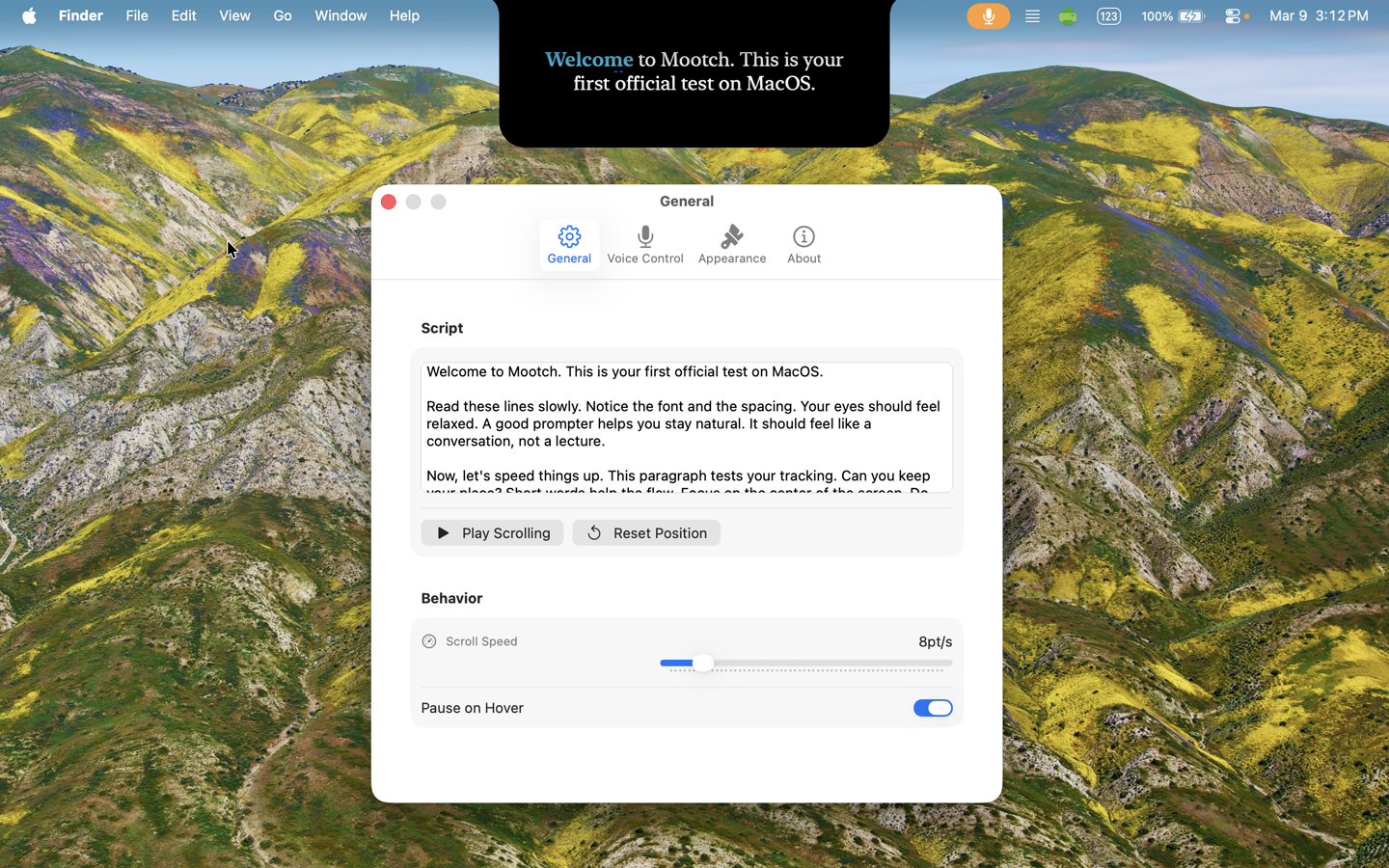
An AI-driven teleprompter for macOS that hangs from your notch and auto-scrolls at the exact pace of your voice. 100% offline. 100% free forever — no subscriptions, no ads, and no in-app purchases ever.
Built for
Anyone who has to talk to a camera.
Creators
YouTube, TikTok, podcast video
Sales & CS
Demos, discovery calls, pitches
Educators
Lectures, course recordings
Speakers
Webinars, keynotes, all-hands
Features
Everything you need. Nothing you don't.
Voice-driven
Local Whisper transcription paces the prompter to your voice — pause, slow down, jump back, it follows.
- · Word-perfect tracking, even on repeated words
- · Hallucination filter strips background-noise drift
- · Tiny / Base / Small / Medium models, or load your own
- · Manual mode if you'd rather scroll at a fixed speed
Designed for camera
Sits where your eyes already are — under the notch — so you stop reading sideways and start sounding natural.
- · Notch dock or persistent floating position — drag anywhere
- · Mirror flip & Markdown rich text styling
- · Presenter remote & slide clicker key mappings
- · 12 languages plus auto-detect
Built to disappear
Floats above every window and stays invisible to anyone watching your shared screen. Nobody sees Mootch but you.
- · Hidden from Zoom, Meet, Teams, Webex, OBS
- · Click-Through transparency overlay
- · 100% offline — voice and script never leave your Mac
- · Multi-monitor & native Operator Desk window
More than a prompter
A whole studio in your notch.
Because Mootch understands every word you say, it does things a plain scroller never could.
Rehearsal coaching
Run a take and get a report — words-per-minute, peak pace, tracking confidence, and a map of every pause. Tighten your delivery before you hit record.
Native Operator Desk
Secondary control screen (⌥⌘D) featuring a live editor, visual cue jumping list, pacing sliders, and font sizing settings. Perfect for operator workspaces.
Markdown Rich Text
Format your scripts using bold (`**`) and italic (`*`) Markdown tags. Rich presentation traits are preserved and scaled correctly at any zoom level.
Clicker & Remote Keys
Full key mappings support standard wireless remotes, keyboard arrows, Page Up/Down, Space (play/pause), or R (reset) to run your takes.
Click-Through Overlay
Overlay transparent prompter text on top of Zoom, Meet, or OBS and continue to click background buttons directly through the window layout.
Director Mode
Scan a QR code to drive Mootch from your phone — play, pace, jump between cues, and read along. Connections are token-secured for complete privacy.
Live captions
Export perfectly-timed .srt and .vtt captions from your take — clean text straight from your script, timed to your voice. Drop them onto your video.
Script library
Save every script with its own speed and font size, and load it back in one click. Import from .txt, .rtf, .pdf, and .docx.
Cue markers
Mark sections with ## headings or [CUE] tags, then jump between them with a keystroke — or from your phone.
Visual reading guides, adjustable column margins & live scrolling mirror.
- Visual Reading Guides. Anchors the presenter's gaze under the camera with a customizable highlight bar and/or side pointer chevrons on the reading line.
- Adjustable Side Margins. Narrow the text column inside settings to prevent side-to-side eye movement, ensuring presenter eye contact looks completely natural.
- Live Operator Desk Mirror. A real-time scrolling view panel on the Operator Desk (secondary window) that automatically centers and highlights the active line being read.
- Markdown Rich Text & Clickers. Bold (`**`) and italic (`*`) text styling support directly in scripts, plus slide clicker controls (Arrows, Page Up/Down, Space).
- Click-Through Transparency. Overlay the prompter over Zoom, Meet, or OBS and click on background buttons directly through the text.
What’s next on the horizon.
We’re continuously working on features that boost presenter confidence and simplify studio workflows. Here is a sneak peek at what’s currently in active development:
- Custom Typography Spacing & Accessibility Themes. Sliders for character kerning and word tracking, plus high-contrast studio themes (Classic, Amber, Matrix, Blue) to reduce visual fatigue.
- Native iOS Companion Remote. An offline P2P Bluetooth and LAN WebSocket app to manage speed, text sizes, and scripts on your iPad or iPhone even on locked-down studio networks.
- In-Browser AI Speech Demo. Test out Mootch's signature voice-activated scrolling directly on our landing page using the web microphone API.
Compare
How Mootch stacks up.
See why professional creators and speakers choose Mootch over alternative teleprompter software.
| Capabilities |
Our Choice
Mootch
|
NotchPrompter | PromptSmart | QPrompt | Teleprompter Premium |
|---|---|---|---|---|---|
| Offline Voice Scrolling (AI) | Yes Local Whisper Model | Yes Simple STT | Yes VoiceTrack Engine | No | No |
| Notch / Pendant Docking | Yes | Yes | No | No | No |
| Invisible to Screen Share | Yes Zoom / Meet / Webex / OBS | Yes | Yes | No | No |
| Click-Through Transparency | Yes | No | No | No | No |
| Markdown Rich Text | Yes | No | Yes | Yes | Yes |
| Dual-Screen Operator Desk | Yes Native Control | No | Yes Remote Link | Yes Native Control | Yes Native Control |
| Web Browser Remote (QR) | Yes Local QR Code | No | Yes Paid Companion App | Yes IP Web Portal | Yes Paid iOS/Mac Link |
| SRT/VTT Subtitle Export | Yes SRT / VTT Export | No | No | No | No |
| Rehearsal & Pace Coaching | Yes WPM & Pace Coaching | No | No | No | No |
| Dyslexic-Friendly Font | Yes OpenDyslexic | Yes OpenDyslexic | No | No | No |
| Privacy Guarantee | 100% Offline Local Whisper Model | Online API External Processing | Online API External Processing | No Voice Logic | No Voice Logic |
| Pricing / License | 100% Free Forever | Paid One-Time License | Paid Subscription | Free Donations | Paid Subscription |
100% Free. Forever.
No subscriptions, no accounts to create, no ads, and absolutely zero in-app purchases. Mootch runs entirely on your device, offline and private.
FAQ
Quick answers.
Is Mootch really free?
Yes. Free on the Mac App Store with no in-app purchases, no subscriptions, no upsells. If you want to support development, there's a donate link, but it's never required.
Does my voice get sent to the cloud?
Never. Mootch transcribes locally with whisper.cpp. Your microphone audio and your script never leave your Mac. You can airplane-mode the whole machine and it still works.
Will my audience see Mootch on Zoom or Meet?
No. Mootch sets a "hidden from screen capture" flag, so when you share your screen on Zoom, Meet, Teams, Webex, OBS, or QuickTime, the prompter is invisible to everyone but you.
Will the AI slow my Mac down?
The default Tiny model is built for live use and barely shows up in Activity Monitor. If you want maximum accuracy, you can switch to a larger model — but most people stay on Tiny.
Can I control Mootch from my phone?
Yes — Director Mode. Scan a QR code with any phone on the same Wi-Fi to play, adjust the pace, jump between cues, and read along. Each session is protected by a one-time token embedded in the code, so only the device you paired can control the take.
Can Mootch make subtitles for my video?
Yes. After a take in Smart mode, export timed .srt or .vtt captions. The text comes straight from your script — so it's always spelled correctly — and the timing follows where your voice actually was.
Do I have to talk for it to scroll?
No. Manual mode scrolls at a fixed speed you control. Voice activation starts/pauses when you speak. Smart mode follows your words. Pick whichever fits the moment.
What do I need to run it?
macOS 14.0 or later, on Apple Silicon or Intel. Hardware-accelerated where possible. The whole app is a small download from the Mac App Store.
Ready to talk to the camera?
Stop reading sideways. Stop memorizing. Start sounding natural.
- Free, forever
- No account, no credit card
- Works offline
macOS 14.0 or later · Apple Silicon & Intel